FAQ:
How to download video from Dailymotion (or others)?
What video formats can I download?
From what sites I can download videos?
How long does it take to download Dailymotion video (or others)?
How to rename saved file to .mp4?
How this site works and what is it?
Why could not find any download links?
Why are some files saved without the ".mp4" extension?
I can not download a video file. Downloading is broken :-(
A video file isn't saved and starts playback automatically in a web browser :-(
The downloaded video file "doesn't work" :-(
How can I convert FLV video to MP4, MPG, WMV and other formats?
How can I convert OGV video to other format?
I press "Download" button, but file download does not start :-(
How to use a bookmarklet for video downloading in Mozilla Firefox?
How to use a bookmarklet for video downloading in Apple Safari?
How to use a bookmarklet for video downloading in Opera?
How to use a bookmarklet for video downloading in Google Chrome?
I have not found the answer to my question :-(
How to download video from Dailymotion (or others)?
How can I download video to computer/device?
1. Copy Page URL with a favourite video from your browser address bar;
2. Paste Page URL into the site form (SAVEVIDEO.ME) and press "Download";
3. Press on the found direct link ("Download video file" under the form) the right mouse button and select "Save link as..." from the context menu to save a video file to your device.
Use for example: VLC Player for video playback (.mp4, .webm or others);
4. Some video hosting sites/platforms do not provide you with the real name of the video file.
So, you will need to rename a file before or after saving (For example: video.mp4).
See also these video examples:
What video formats can I download?
Depending on the video hosting/site, videos can be downloaded in MP4, WebM, FLV format.
But not all video hostings/sites have the ability to download different video formats.
For example, you can download from Dailymotion in MP4 format.
For Dailymotion videos in high quality – it is possible to download MP4 video file in HD (720p) or Full HD (1080p) resolution/quality. It depends on the video.
It is possible to convert a saved video using any video converter software/app.
From what sites I can download videos?
SAVEVIDEO.ME supports the following video sites and platforms:
- Aol Video
- Bilibili.com (哔哩哔哩)
- Bilibili.tv
- Coub
- Dailymotion
- DouYin (抖音)
- Facebook Video
- Flickr Videos
- Focus.de (Focus Online)
- GMX.net / WEB.DE
- Instagram Video
- ItemFix
- Magisto
- MSN
- Reddit Video
- Rumble.com
- Sapo.pt
- Snapchat / Stories
- Streamable.com
- T.me (Telegram)
- Threads.net
- TikTok
- Tiscali.it Video
- Tudou.com
- Vidmax.com
- Vimeo
- Vine (archive)
- WorldStarHipHop (WSHH)
- X.com (Twitter Video)
- Youku.com
How to play FLV video?
Video was saved successfully, but how can I watch/play it now?
Not any video player can play a video file saved in FLV format. You will need a special player.
Choose a suitable FLV video player allowing to play videos in FLV format.
For example, you can download and install the free VLC Media Player or the free GOM Player. Or you can find any other video player.
How to play OGV video?
OGV file was saved successfully, and how can I watch it now?
Not any video player can play a video file saved in OGV format (OGG).
You will need a special player.
Choose an OGV video player allowing to play videos in OGV format (depending on OS).
Or you can download and install, for example the free VLC Media Player or the free SMPlayer. Or you can download and install the new version of web browser Mozilla Firefox with possibility of viewing OGV file directly in a browser window. Or you can find any other video player.
How long does it take to download Dailymotion video (or others)?
Download speed depends on the weight of the video file (Dailymotion or any other) you are saving, on the video duration and on the bandwidth of the internet connection (On all sides). In addition, third-party servers of video sites/hosting/platforms or social media may also limit video download speed depending on geolocation or other reasons.
What is a streaming video?
A streaming video is a video file located on a remote server that is streamed to a user's web browser by that server. Streaming video files are usually hidden behind the server's stream player or may be available in the video player.
In any case, a web browser simply downloads video file(s) to the temporary memory of a user's web browser (in the background) while a user watches any video in a video player on any website.
How to rename saved file to .mp4?
Just renaming a file extension does not mean "converting to the new video format". It only makes sense if a file is actually "MP4 video", but the file extension is lost for unknown reasons...
So if you want to change a file extension to .mp4, find your downloaded file and rename the file extension from .htm (or .part) to .mp4 extension in the filename (if the file has been saved for example as "videofile.htm" or "videofile.part").
If the file has been saved for example as "videofile.mp4.htm" – it is possible to rename the filename by removing the extra .part from the name in order to get the correct extension in the end of the filename ("videofile.mp4").
If there is no extension, just add .mp4 to the end of a filename (for example like this: "videofile.mp4")..
Probably you will need to enable display of the File Extension if the full name of a file isn't visible to you:
– For Windows OS in any folder go to "View" or "Tools" (In older versions of Windows, you first need to press Alt key to access the top menu, if it's hidden) > Next select "Options" (or "Folder options") > "View" tab then scroll down to "Hide extensions for known file types" and uncheck that box.
Click "ok" to save changes. Now you can see the file extension which you can rename if necessary.
How this site works and what is it?
This web tool is designed to help you to find direct link(s) to video file(s) of your favorite online video and save it to your device.
To download a video, paste URL address/link of your favorite video page into the site form and press the "Download" button.
The SAVEVIDEO.ME algorithm tries to find and detect direct link(s) to the video file(s).
As a result of successful processing, choose the video quality you want and click/press on the found "Download video file" link to save it on your device.
Please, do not forget that a video has a lawful legal owner.
Is SAVEVIDEO.ME free to use?
Yes. It's absolutely free.
Why could not find any download links?
I can watch my video easily on a video page, but your website says that "Could not find any download links or site not supported". Why?
The search algorithm of direct links is different for each video site/platform. Therefore, sometimes a direct link can not be found on some video sites for example if a video site is not yet supported by SAVEVIDEO.ME, or for other unknown reasons.
Check that a Page URL with your video is copied correctly.
Why are some files saved without the ".mp4" extension?
I need to rename it manually.
Since a video file is hosted/located on a third-party server of video hosting/site/platform but not hosted on the SAVEVIDEO.ME server, the "file extension" (e.g. – .mp4) is defined by a third-party video site/hosting/platform server (Where a video is hosted).
So SAVEVIDEO.ME just tries to find and detect direct link available to downloading, but does not handle the process of saving a video file from a third-party server.
I can not download a video file. Downloading is broken :-(
When I try to download a file, downloading stops and I have to download again. Why is this happening?
It depends not on SAVEVIDEO.ME.
A video file is hosted on a third-party server of video hosting/site/platform. Therefore you're downloading a video file "not from SAVEVIDEO.ME".
Either a third-party server of a video site/hosting (Where a video is hosted) is temporarily overloaded or a third-party server limiting the download for various reasons (Limiting by IP address or by country).
Try to download a video again later...
Also, if your internet connection is very slow, stability of downloading isn't guaranteed.
A video file is not saved but plays automatically in a web browser :-(
When I press download a video file, playback starts automatically instead. How to save video without auto playback?
Try to save a video via the context menu of your browser or right mouse button by selecting "Save link as..." or "Save video as...".
On mobile device, "tap and hold the video" until download/save options pops up. Or use the context menu and interface of mobile browser.
The downloaded video file "doesn't work" :-(
I have downloaded a video through this site, but it can not be played. Why?
There are several possible reasons why the downloaded video file is not working:
1. It seems that is not yet installed a suitable video codec on your device. You can try to download and install K-Lite Codec Pack for your desktop system.
2. Perhaps, your video player does not support the format of a downloaded video file. Try to install other video player.
3. The extension of a saved file not ".mp4". Try to rename a file to "videofile.mp4".
How to rename a video file extension
How can I convert FLV video to MP4, MPG, WMV and other formats?
There are many different programs (FLV Converters) that can convert FLV video to all popular formats (MP4, MPG, AVI, WMV, MOV, PSP, 3GP etc.). You can also use several different converters to get the video format that you want.
How can I convert OGV video to other format?
There are many good OVG Converters.
You can choose here (depending on OS). Or you can find any another OGV Converter that can convert OGV video to all popular formats (MP4, MPG, AVI, WMV, MOV, PSP, 3GP and more). You can also use several different converters to get the video format that you want.
I press the "Download" button, but file download does not start :-(
The "Download" button is used to start detecting of direct links. After SAVEVIDEO.ME will have a successful search results – press a found direct link ("Download video file" under the form), and it will start the file downloading.
How to use a bookmarklet for video downloading in Mozilla Firefox?
Turn on the display of the Bookmarks Toolbar by right-clicking on an empty space of the Tab Strip and selecting Bookmarks Toolbar from the context menu.
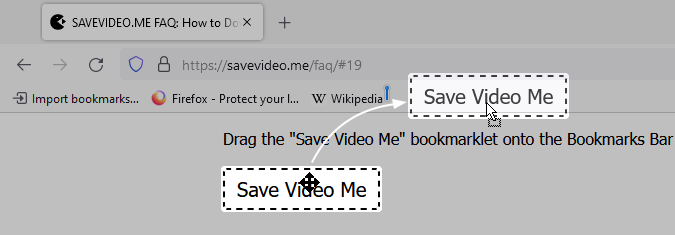
Drag the "Save Video Me" bookmarklet onto the Bookmarks Bar of your Firefox browser.
Save Video Me ← Drag this to your Bookmarks Bar
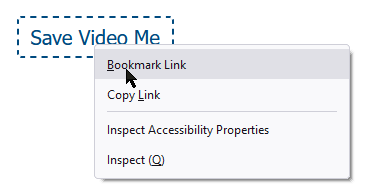
Or add the bookmarklet to bookmarks via the context menu or right mouse button.
Now to download videos from any of supported sites quickly just press on the created "Save Video Me" bookmarklet on your Bookmarks Bar when you're watching a video. SAVEVIDEO.ME will be opened automatically in a few seconds with ready found direct links for download.
See also – Firefox Help
How to use a bookmarklet for video downloading in Apple Safari?
Make sure the Favorites Bar of your Safari browser is turned on and visible.
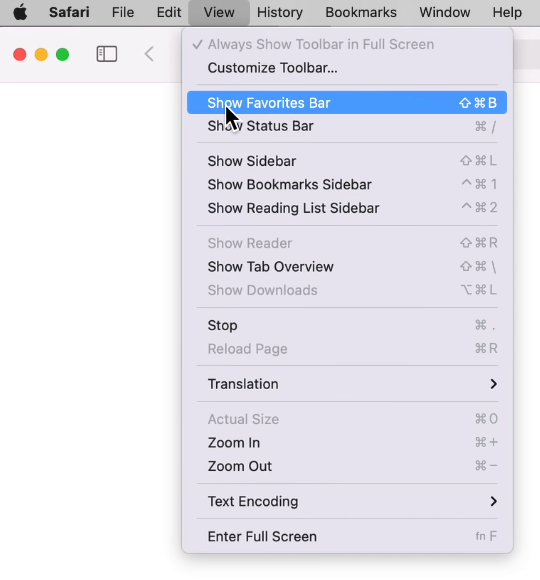
On macOS, go to the Safari menu: Select "View" > and then select "Show Favorites Bar".
You can also use the keyboard shortcuts Cmd ⌘+Shift ⇧+B to toggle the Favorites Bar on.
Or on iPad, go to "Settings" and tap on "Safari". Set Show Favorites Bar to "ON". Tap "Advanced" and set JavaScript to "ON".
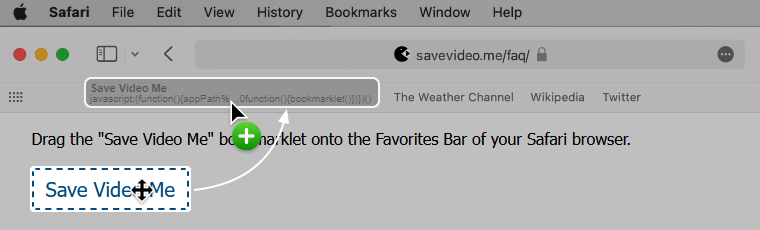
Then drag the "Save Video Me" bookmarklet onto the Favorites Bar of your Safari browser (macOS).
Save Video Me ← Drag this to your Favorites Bar
On iPad Safari:
- Go to "Settings" and tap on "Safari". Set Show Favorites Bar to "ON". Tap "Advanced" and set JavaScript to "ON".
- Copy the Bookmarklet code SAVEVIDEO.ME above.
- Next, tap on the share icon (square with arrow) at the top of your Safari browser and tap "Bookmark". Ensure that it will be saving to the "Favorites" and then tap "Save".
Now, you will need to update the temporary bookmark with the code for the bookmarklet. - Tap on the bookmark icon (open book) to pull up your bookmarks. Tap on the "Favorites" folder. Then tap "Edit" in the corner of your window.
- Select the bookmark that you just created. Change the name to SAVEVIDEO.ME
- Next, erase the URL shown and paste – the bookmarklet code for SAVEVIDEO.ME (press and hold, then release, then tap "Paste").
- Tap "Favorites" located in the bottom top left corner to go back. Tap "Done" located in the corner. Tap the bookmark icon to make it disappear.
On iPhone Safari:
- Create a temporary bookmark in iPhone Safari.
Tap the middle icon below, then tap Add Bookmark. And then tap Save. - Copy the Bookmarklet code SAVEVIDEO.ME above.
- Tap the Bookmarks button in the toolbar.
- Tap Edit. Select the SAVEVIDEO.ME bookmark to edit.
- Tap its URL, tap the "x" icon to clear it. Tap-and-hold for the magnifying glass. And then tap Paste.
Now to download videos from any of supported sites/platforms quickly just press on the created "Save Video Me" bookmarklet on your Favorites Bar when you're watching a video. SAVEVIDEO.ME will be opened automatically in a few seconds with ready found direct links for download.
How to use a bookmarklet for video downloading in Opera?
Turn on the Bookmarks Bar in the browser, if the Bookmarks Bar is hidden.
To show the bookmarks bar on Windows or Linux, press  Opera Menu button in the top-left corner of the browser, then go to "Bookmarks" > and select "Show bookmarks bar".
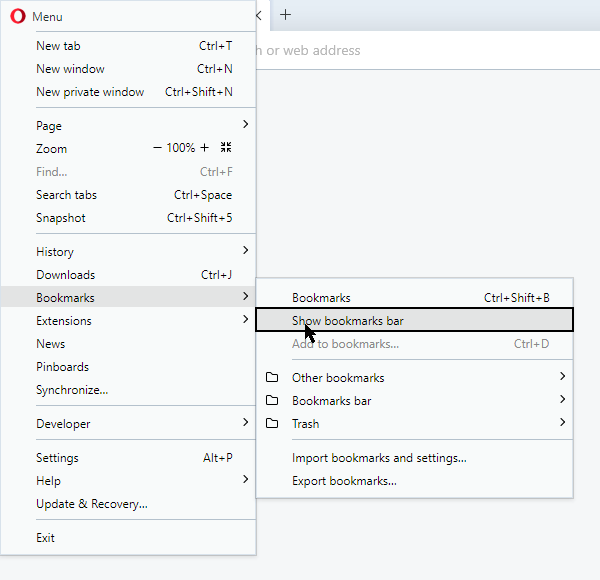
Or on macOS, go to the menu: Select "View" > and then select "Show bookmarks bar".
Alternatively, you can go to Easy Setup  icon in the top-right corner of your Opera browser and click "Show bookmarks bar".
See – Opera Help
Drag the "Save Video Me" bookmarklet onto the Bookmarks Bar of your Opera browser.
Save Video Me ← Drag this to your Bookmarks Bar
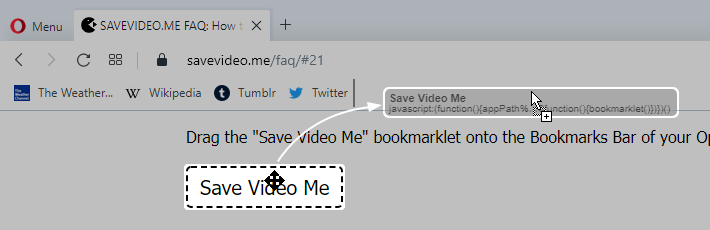
Now to download videos from any of supported sites quickly just press on the created "Save Video Me" bookmarklet on your Bookmarks Bar when you're watching a video. SAVEVIDEO.ME will be opened automatically in a few seconds with ready found direct links for download.
How to use a bookmarklet for video downloading in Google Chrome?
Make Bookmarks Bar Visible in the browser, if the Bookmarks Bar is hidden.
Use Chrome menu  on the browser toolbar.
Or (for macOS) go to the menu: Select "View" > and then select "Always Show Bookmarks Bar".
You can also use the keyboard shortcuts Ctrl+Shift+B (for Windows and Chrome OS) or Cmd ⌘+Shift ⇧+B (for macOS) to toggle the Bookmarks Bar on.
See – Chrome Help
Drag the "Save Video Me" bookmarklet onto the Bookmarks Bar of your Google Chrome browser.
Save Video Me ← Drag this to your Bookmarks Bar
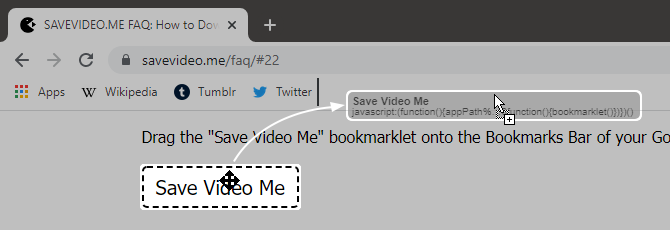
For mobile devices:
Copy the Bookmarklet code SAVEVIDEO.ME above. Then paste copied code instead of the address of the new bookmark in your mobile device. And Save it.
For iOS Google Chrome users see – video about bookmarklets
Now to download videos from any of supported sites quickly just press on the created "Save Video Me" bookmarklet on your Bookmarks Bar when you're watching a video. SAVEVIDEO.ME will be opened automatically in a few seconds with ready found direct links for download.
Can I donate to SAVEVIDEO.ME?
If you want to support, you can donate to SAVEVIDEO.ME and make it even better.
I have not found the answer to my question :-(
Feel free to ask a question, report a possible bug or suggest an idea. It would be very helpful.